显示标签为“ethernet switch”的博文。显示所有博文

2018年9月5日星期三

Best Way to Set Up Ethernet Switch and Mesh Network

Want to connect all your wired and wireless devices and expand your network with ease? Setting up an Ethernet switch and mesh network may be the best way. Because today it becomes increasingly difficult to use only a router to make your all connections since the approach of IoT. However, Ethernet switch and mesh network will function adequately no matter how many connections you want to make. Here focus on the Ethernet switch and mesh networking.

Why Mesh Networking?

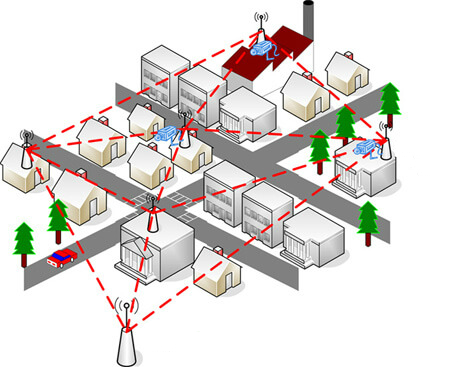
Unlike the stand-alone routers, which will arise signal loss or strength drops when you go away from them, while mesh Wifi networks can use another connection to create a continuous wireless link which minimizes the possibility of dead zones. For example, you put your router in the downstairs living room. When you are on the first floor, your phone can connect to the Internet with a strong signal. But when you want to search the Internet in the upstairs office, the signal would degrade. Of course, you can boost a Wifi router’s connection with a signal amplifier. But in that situation, you have to manually connect your phone to the amplifier’s Wifi network. And if you go back to the downstairs, you have to switch back to the main router’s wireless network again. What a pain! Luckily, working with mesh Wifi networks, things are different. In a wireless network, all the nodes are connected with each other which means any node could be an Access Point (AP). Therefore, through the APs, wireless mesh network allows your phone automatically connects to the strongest signal no matter you are in the upstairs or downstairs. That’s better than what we could do with the traditional router Wifi networks.
mesh network_
Figure 1: Mesh network exists in our life.

When to Set Up Ethernet Switch and Mesh network

If you want to build a wireless mesh network, using an Ethernet switch is a good choice. Before installation, you should consider how much coverage you need in your home. For many people, the money might be better spent on a Wifi router with good quality, since the mesh network equipment like the switches cost too much. But if you want to cover a large area with signal and your home brick is too solid for signal travel through, then use a switch to build wireless mesh network is a way to go.

Use FS Ethernet Switch to Build Mesh Network

Achieving a cheap mesh network is based on switches. FS.COM publishes a set of Gigabit Ethernet switch supporting 1G, 10G, 40G and 100G Ethernet, in order to meet different demands. All the Ethernet switches meet all design and safety standards made by international and industrial organizations like ISO9001, FCC etc.
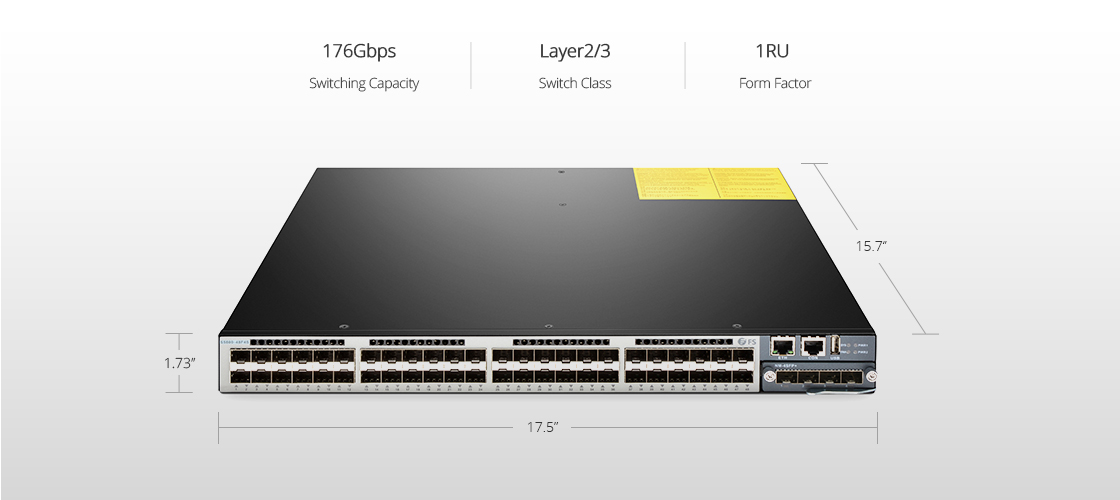
The following is a 10Gb switch named S5800-48F4S. It has 48 1GbE SFP ports and 4 10GbE SFP+ ports. This switch is a Layer2/3 switch with low latency of 2.3us. With the switching capacity, it provides a throughput of 130.95MB. Besides, it supports functions like MLAG, SNMP and so, making it becomes popular on market. Following the S5800-48F4S switch installation guide, you can easily finish the switch installation. Then you can configure the bridge parameters of AP according to the installation instructions to build a mesh network.
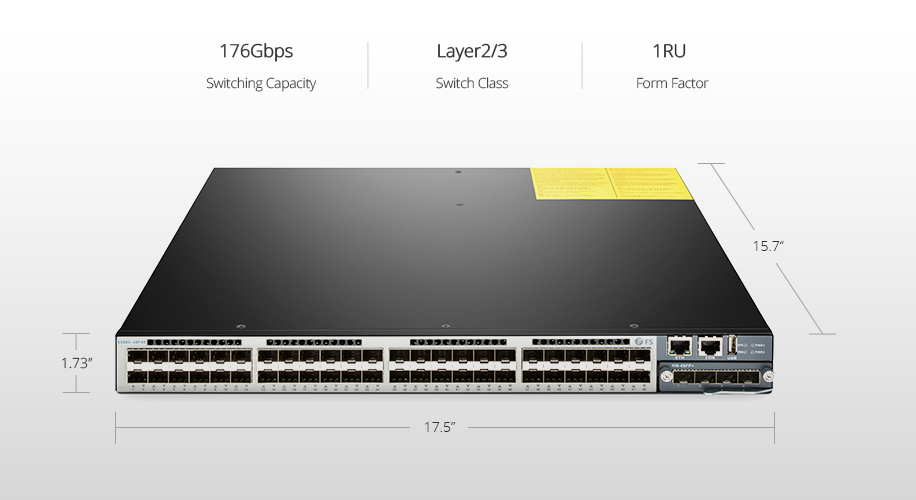
48 port Ethernet switch
Figure 2: S5800-48F4S 48 Port Ethernet Switch

Conclusion

Due to mesh network advantages and disadvantages, we understand why and when to use wireless mesh network. Based on Ethernet switch, mesh networking can spread out fast Wifi across a relatively large area, which makes our life and work more efficiently. So don’t hesitate, pick one Ethernet switch from FS.COM to optimize your Wifi network.

2018年8月10日星期五

What Is IGMP Snooping

With the development of Internet technology, traditional network unicast mode can’t meet today’s data transmission requirement. On the contrary, this mode increases network load and consuming network bandwidth greatly. IGMP snooping is developed to solve the problem. So what is IGMP snooping?

Introduction of IGMP Snooping

IGMP (Internet Group Management Protocol) is a communications protocol. So what is IGMP used for? Commonly, it’s used to establish membership in a multicast group. And each member host of an IP multicast is a transmitter or receiver.
As for IGMP snooping, which sounds like an obscure hacker technique that may break into one’s network, is actually an advanced option available on most of switches or routers. Wiki defines it as the process of listening to IGMP network traffic. It is a multicast constraint mechanism running on the two-layer device, which is used to manage and control the multicast group. If there are plenty of multicast traffic in your network, the whole performance may be effected due to the excessive false flooding. At this moment, IGMP snooping switch can help to optimize your network. It enables the Gigabit Ethernet switch configured with IGMP snooping decides which devices will receive the applicable multicast traffic, thus the others won’t receive the message. This means broadcast packet on layer 2 has been reduced so that the network bandwidth will be conserved. Besides, IGMP snooping helps improve message information.

IGMP Snooping Process

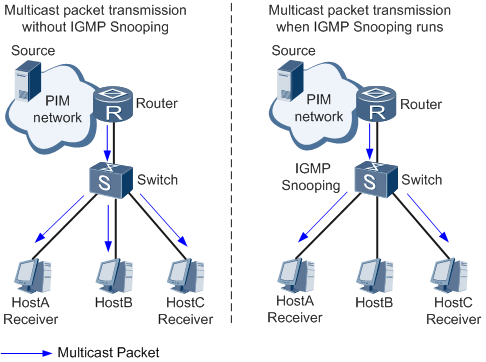
After knowing what is IGMP snooping, let’s see how it works. Once a device joined the multicast group, the router or fiber switch will notice this. Then the message cab forwarded to the devices that have joined the multicast group. Look at Figure 1, when the switch runs without IGMP snooping, the multicast packet will be transmitted to host A, B and C. But when the switch has set up IGMP snooping, only multicast group members host A and C can receive the multicast packet. This is the main IGMP snooping tutorial.
What Is IGMP Snooping
Figure 1: The picture shows how IGMP works.

Using FS.COM Switch to Build IGMP Snooping 

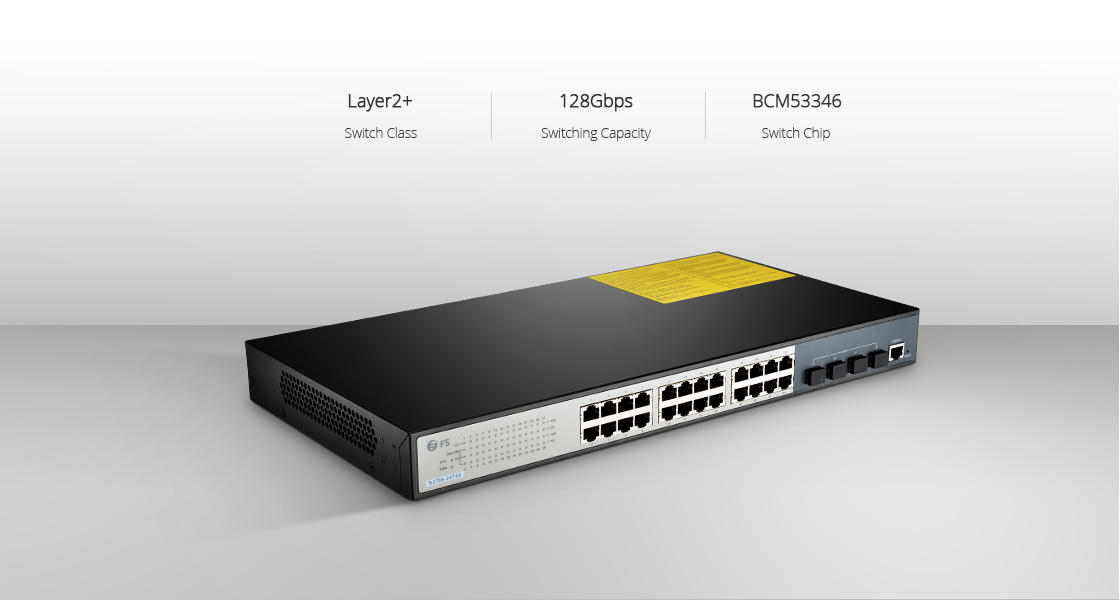
To keep pace with the technology development, FS.COM releases a set of switches to help customers establish IGMP snooping. Here is a 24 port switch named S3700-24T4S. The 1G managed switch provides an affordable solution for business of all sizes requiring switches with essential L2 switching features like VLAN and IGMP snooping, along with a simple and intuitive management interface. It includes 24 10/100/1000Base-T Ports and 4 10G SFP+ ports to extend your home or business network at gigabit speeds. Equipped with ARM CPU and BCM53346 chip, the Lay 2 switch has a switching capacity of 128Gbps, which is compliant with the international standard.
Ethernet switch
Figure 2: S3700-24T4S 24 Port Switch

Conclusion

Now I think you know the answer of the question we posed at first, what is IGMP snooping. When IGMP snooping is enabled, the bandwidth consumption will be reduced in a multi-access LAN environment so as to avoid flooding the entire VLAN. Any question about IGMP snooping configuration, please contact us via support@feisu.com.

2018年8月9日星期四

Ethernet Switch vs Splitter—How Much Do You Know?

Today, our lives hardly do without Internet communication. We do shopping, letter writing and business all relying on the Ethernet connections both at home and office. And Gigabit Ethernet switch and splitter are the networking devices that are primarily used for connecting different computers or other networking devices. However, they are quite different. Here focus on Ethernet switch vs splitter.

Ethernet Switch vs Splitter: What Are They?

First, let’s figure out the definitions of the two terms.
What Is Ethernet Switch?
An Ethernet switch is a high speed networking device that provides more ports for subnets to connect more computers, printers, cameras and so on in a building or campus. Through the ports, the data switch can receive incoming data packets and redirects the data to their intended destination within a LAN. Usually, an Ethernet switch not only works at the data link layer which is also called layer 2, but also can operate at the network layer (layer 3) or above.
What Is Splitter?
A network splitter acts as the optical power distribution device, like a coaxial cable transmission system. It’s one of the most important passive devices which means it doesn’t need external power except for light. As the name implies that it can split a single Internet connection to create extra connections, as a result the additional or other computers on a network could be connected.

Ethernet Switch vs Splitter: What Are the Differences?

Ethernet switch can be used for networks that include different devices, for example, a computer and a video game console or a printer. In addition, general switch needs a power input so that it can divide an Ethernet signal into various signals, and the signals can operate at the same time. As a result, different devices can be connected by the switch and work simultaneously.
As for Ethernet splitter, there is no need for power input. And splitters need to be used in pairs. It physically splits a single Ethernet connection into two connections. Simply put, if you want to connect two computers in one room and a switch in another room, then you need the splitters. Instead of using two Ethernet cables from one room to another, the splitters can physically split one Ethernet cable into two to connect the computers and the switch. This is the main principle for the issue that how to use Ethernet splitter.

Ethernet Switch vs Splitter: Where to buy?

The following products of Ethernet splitter vs switch are from FS.COM.
S5800-48F4S Switch
This is a 10gb Ethernet switch that has 48×1GbE SFP ports and 4×10GbE SFP+ ports. With a switching capacity of 176Gbps, it supports comprehensive L2 and L3 network management features. The switch offers MLAG, MPLS, IPv4/IPv6, SNMP etc. Designed with the max power draw of 75W and switching capacity of 176Gbps, this switch is ideal for traditional or fully virtualized data center.
Ethernet Switch vs Splitter-switch
Figure 1: S5800-48F4S Switch

Conclusion

As for Ethernet switch vs splitter, we have known how do Ethernet splitters work and how do switch work. Both of them can optimize our network that allow us to work in an efficient and high secure way. Welcome to visit FS.COM to pick your own Ethernet switch and splitter.