2019年1月4日星期五

White Box Switch vs Brite Box Switch: Which to Choose?

Open networking means the switch hardware and switch software can be developed independently from each other. With an open networking environment, many organizations have realized open source benefits such as improved flexibility and reduced costs. When IT staff decide to build this open networking, they may come across the word of white box switch or brite box switch. Both the two types of open source switches can be used in data center SDN (software defined network) environment. But what’s the difference between them, and which one should you choose? This is the point here, we will provide some definitions and perspectives so you can make the right choice.
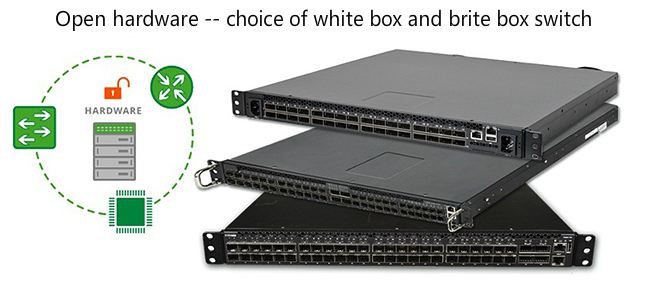
White box switch vs brite box switch

What Is White Box Switch?

White box switch is a by-product of SDN, which decouples the hardware (a bare metal switch) from the NOS. It allows customers to buy open switch hardware and pair it with their preferred networking operating system (NOS) like Cumulus Linux or PicOS. Customers can buy white box switch from hardware suppliers like Accton, Quanta. In its early development, white box switches are popular in the huge scale data centers like Facebook, Google, because they have the technical team who can operate Linux. Therefore, they can configure the hardware and the software by themselves. But today, small and medium organizations also try to introduce white box switch to improve their networks.

What is Brite Box Switch?

The term brite box is a white box switch but with a brand name such as Dell and HP on them. Essentially, people could regard brite box switch as the middle ground between a traditional switch and white box switch. But not that brite box switches are pre-loaded with a vendor’s (e.g. Cumulus Networks or Big Switch Networks) operating system. Thus, using brite box switch, customers can receive professional service from the hardware and software suppliers. And the cost of brite box switch is much cheaper than the traditional switch price. As an open source switch, it allows customers to have the flexibility to choose the software and configure their networks.

White Box switch vs Brite Box Switch: Which to Choose?

The future of open networking lies within the choices of “white” and “brite”. Both of them are open source switches, offering open networking hardware that IT staff can enjoy the flexibility that is expected in a software defined network. With white box and brite box switch, hardware and software are no longer coupled, and as a result, companies can avoid the traditional vendor lock-in which has been a feature of hardware ownership. And note that they may have the same switching chip made by the same producers like Microsemi and can achieve advanced features like MLAG, VxLAN. However, they also have differences as followed.
Technical Support
This is the typical difference between the two open source switches. Brite box switch preloaded with NOS can provide better technical service and support from the vendors, while white box switch is a bare metal switch which requires users to buy NOS by themselves. Therefore, only the hyperscale organizations like Amazon and Facebook have the resources to afford the technology of white box switching, because they have the IT engineers who are familiar with Linux operations. They can run and maintain the NOS by themselves. On the other hand, brite box switch eliminates the need to have a network software team to write an operating system, which is more suitable for small and medium networks without IT engineers. They could get technical help or support from the vendors while enjoying the open source networking.
Cost
The cost of white box switch is cheaper, since customers don’t need to pay for the NOS. They have the freedom to choose a NOS with lower price. Therefore, operating expenditure of white box switch is much lower than that of brite box switch.

Conclusion

Choosing a white box switch or brite box switch, organizations should make the decision based on their own conditions. For large data centers, white box switch is a nice choice since they have the experts who can operate Linux, while brite box switches are suitable for small and medium organizations since they can offer professional software support.
To satisfy customers’ various demands, FS has released N-series open network data switch with Cumulus Linux, which can receive professional support from FS and Cumulus. If you have more questions about open networking, please contact us through sales@fs.com. We are the reliable networking solution supplier, including a broad portfolio of network switches that range from Gigabit Ethernet switch to 10G/25G/100G switch, and based on the ports there are 8 port switch, 24 port switch, 32 port switch and 48 port switch.

Shielded vs Unshielded Ethernet Cable: Which Should You Use?

Ethernet cables are classified into sequentially numbered categories (e.g. Cat6, Cat7) according to different specifications. And these categories are how we can easily know what type of cable we need for specific transmission speed, Cat5e Ethernet cable supports up to 1000Mbps, while the latest category Cat8 Ethernet cable can be up to 25/40Gbps. But as for shielded vs unshielded Ethernet cable, how to choose? To find this out, make sure you know the basic information and differences between the two types.

Shielded vs Unshielded Ethernet Cable: Basic InformationPreview Changes

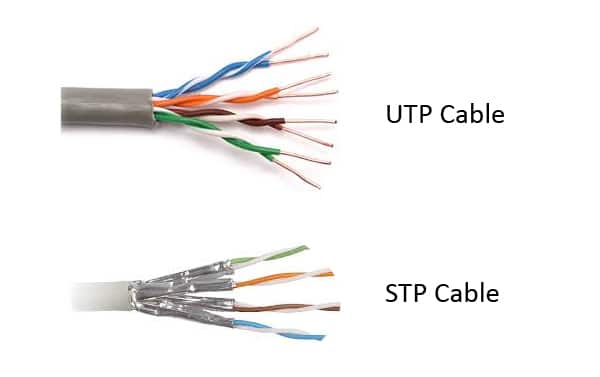
A shielded cable or shield twisted pair (STP) cable has an outside layer or “shield” of conductive material around the internal conductors, which needs to be grounded to cancel the effect of electromagnetic interference (EMI). The conductive shield can reflect or conduct external interference away without affecting the signals of the internal conductor. Therefore, shielded Ethernet cables are usually used to protect signals from EMI over the length of the cable run, so as to result in faster transmission speeds and fewer data errors.
Unshielded means no additional shielding like meshes or aluminum foil are used. Because of this, unshielded Ethernet cables, also called unshielded twisted pair (UTP) cable are lighter and cheaper. These Ethernet cables are designed to cancel EMI with the way the pairs are twisted inside the cables. Compared with the shielded cables, unshielded cables provide much less protection. These cables performances are often degraded when EMI is present.
Shielded vs Unshielded Ethernet Cable
This is a figure of Cat6 shielded and unshielded cable.

Shielded vs Unshielded Ethernet Cable: Difference

Different applications
The typical difference between the two types lies in the application. Because of the shielding material design, STP and UTP cable will result in different performance. For example, Cat6 shielded and unshielded cable can be up to 10Gbps speed. However, in some cases such as the radio or airports stations, Cat6 UTP cable will experience slower speed and more data transmission errors may be caused when they are close to the machines or other electronics that produce high EMI. But with the additional shielded safeguard, Cat6 STP cable can provide some protection from EMI, performing better than the UTP one. Therefore, STP cables are the best choice for the environments where there is a high chance of electronic interference, while UTP is most suitable for office or home LANs.
Different grounding methods
In addition, due to the different designs, their cabling grounding methods are different. UTP cables don’t rely on grounding to the same extent as STP cabling. This will decrease the installation time and cost. However, STP needs a more robust grounding and bonding process. And note that the wrong grounded shield actually can worsen crosstalk and electromagnetic interference.

Which Should I Choose?

As for shielded vs unshielded Ethernet cable, the best choice should largely depend on where you plan to install the cables. As mentioned above, STP and UTP cables are widely used in different fields due to EMI interference requirement. Airports, medical centres and factories often benefit from STP cabling, because these places need to process numerous machines that produce considerable amounts of interference. On the other hand, for home and office use, it’s wise to choose UTP cables.
Besides, the budget is another factor which may determine the final decision. It’s believed that STP cost much more than UTP since it can provide better protection from EMI. It’s true, but the gap is narrow. For instance, Cat6 Ethernet cable at FS, the Cat6 UTP of 10ft length costs 2.6 dollars while Cat6 shield cable with the same length needs 3.6 dollars, there is only a very small gap, which may be significant for large scale installations, but not for small networks.
Therefore, as for shielded vs unshielded Ethernet cable, it should be determined by the intended application. If you’re still not sure what type of cabling you need, please contact us via sales@fs.com for expert advice.

2018年12月28日星期五

Network automation with FS N-series data center switches

As enterprises and data centers increasingly adopt cloud models and expand initiatives like mobility, big data analytics and unified communications, there are tens of thousands of computing, storage and network devices. It’s such a big challenge to manage these processes by traditional manual operation through command line interfaces (CLIs). Under this circumstance, network automation is becoming a necessity for IT departments, allowing them to better utilize and manage the computational and storage resources while maintaining high working efficiency. Then what is network automation? Here focuses on network automation benefits like easier configuration, management, operation, and then explains how FS N-series data switches can help automate networks.

What Is Network Automation?

Network automation is the process of automating the configuration, management, testing, deployment and operation of physical and virtual devices in a network. Automation can be deployed in any type of network, no matter it’s the LAN, WAN, cloud network or wireless network. It can be achieved through a combination solution of hardware like a bare metal Gigabit Ethernet switch and software like the open source software Cumulus Linux. This solution can automatically execute and manage repetitive network process. For example, process like configuring devices, updating software, even implementing security and compliance can be performed automatically.

Network Automation Benefits

There are many advantages of automating network.
Simplify configuration and management
In the past, network administrators used to spend a lot of time setting up and configuring ports and devices to allow and forbid users and applications access to parts of the network, it’s a time-consuming job. Network automation allows network switch to has a flexible scripting mechanism that it can automatically determine the objects affected by a change, undertake or monitor change, and then provide a report.
Reduce human error
It has been proven that network automation can help reduce human error. Updating or changing the configuration of lots of network switches is not an easy job, which should not be done manually. Otherwise, network failures will be caused by the incorrect change. Automated mechanisms can reduce or eliminate the silly mistakes since it allows customers to make changes in one centralized repository.
Reduce cost
This benefit comes as a result of the previous two items. Through network automation, fewer person-hours are needed for devices configuration and management, which can greatly reduce labor cost.

How FS N-series Data Switches Help Automate Networks?

To help customers simplify the complexities in networks such as installation complexities, operational complexities, etc. FS.COM has released N-series data center switches. These are open source switches which are preloaded with Cumulus Linux OS, bringing an open networking environment for users and helping them avoid vendor lock-in. This family includes 10GbE switch, 25GbE switch, 40G and 100G switch, and all the switches can be ToR, Leaf or Spine switches. With low latency and power efficiency in a PHY-less design, N-series data switches can provide stable, reliable and secure Layer 2/Layer 3 switching services. And they are equipped with features like MLAG, SNMP, NCLU, EVPN. Besides, installed with Cumulus Linux, those data center switches can achieve network automation by using various automation tools like Ansible, Chef, Puppet and so on based on their demands. They are all free but offer paid add-ons (such as GUI or support).
FS N-series switch with network automation
FS N-series switches with Cumulus Linux OS also can simplify network configuration and management, and reduce human errors. In addition, with the unique Linux OS, it can bring higher levels of automation to the data center network.
  • More flexible automation.FS.COM N-series network switches are the best choices for data centers or high-end industrial areas, since they can bring customers an open, high-performance and scalable solution for their networks and avoid vendor lock-in. With Cumulus Linux OS, users have the flexibility to choose one automation tool like Ansible that works for their networks, instead of using expensive proprietary products. This will greatly reduce the network budget.
  • Rapid provisioning.Through leveraging off-the-shelf DevOps, deploying network configurations just takes seconds instead of spending months and weeks. All the modern DevOps tools can also create easy to read reports and output accounting data in a variety of formats.
  • Using DevOp modules.Cumulus Networks has developed some modules to make automation much easier. These modules are specific pieces of code built into a DveOps tool to make them more robust, easier to drive and more specific to your situation.
    Besides, FS N-series switches with Cumulus Linux allow users to use the existing automation tools to reduce manual implementation and execute configuration.

Conclusion

Network automation is the key for simplifying network operations and management, which helps reduce human errors and improve working efficiency. FS N-series data center switches adopt web-scale methodology with network automation, allowing customers to enjoy higher levels of automation networks through flexible automation tools and rapid provisioning. Any detailed information, please visit FS.COM or contact us via sales@fs.com.

Copper Cable vs Fibre Optic Cable Price, Is the Copper Really Cheaper?

Budget is always the most direct choice factor when installing cables. Copper cable vs fibre optic cable price, it’s true that the popular impression is that copper is cheap, fibre is expensive. Well, at a certain period in the past decades, it’s true. However, today with the development of networking, is copper cabling really cheaper than fibre optic cabling?
Copper Cable vs Fibre Optic Cable Price

Copper vs Fibre: What’s the Difference?

Copper and fibre optic cable are different cable types. Copper cable, also called RJ45 Ethernet cable, transmits data by electrical impulses, which is perfectly adequate for voice signals. Copper cables have many types such as Cat5, Cat6, Cat7 and Cat8, which can reach different transmission speeds. Cat5 Ethernet cable is once as slow as 10 Mbps over 100 metres. However, on today’s market, copper is getting faster. That the latest technology Cat8 Ethernet cable speed now can reach 40Gbps for 20 metres, but note that it has the notable limitation with regard to distance.
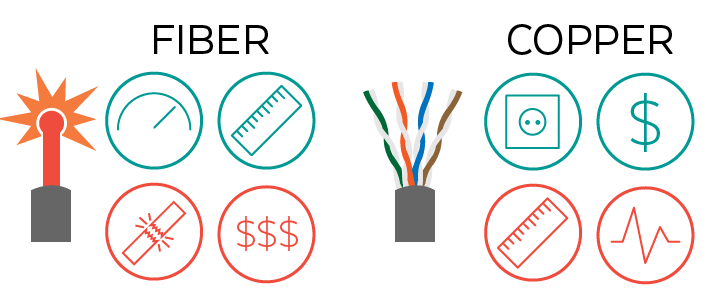
Unlike copper cable, fibre cable is made from fine hair-like glass fibres, which transmits data via light. Therefore, fibre cable does not conduct electricity, which is impervious to radio frequency interference. It’s naturally more durable than copper that it can withstand tougher environments and harsher weather conditions. As for the speed, fibre definitely wins for sheer speed and longer transmission distance. For example, the maximum distance of single mode fibre OS2 can be up to 200km. The following table makes a clear comparison between copper and fibre cables.
 
Fibre
Copper
Distance
Longer
Shorter
Speed
Faster
Fast
Durability
Lower
High
Spark Hazard
Hazardous
No spark hazard
Noise
Immune
Susceptible to EM/RFI interference, crosstalk and voltage surges

Factors of Copper Cable vs Fibre Optic Cable Price

People always believe the cost of fibre optic cables are expensive. Is it true? The following will discuss it in two main factors.
Installation Cost
Due to the technological differences between fibre and copper cables, their installation cost are different. Fibre’s immunity to electromagnetic interference (EMI) can save users’ cost, because they don’t need to lay fibre optic cables in the pipeline for avoiding electromagnetic interference. But copper cables need some protection, which increases the installation cost. Besides, in many scenarios, users need distributed cabinets for copper network while fibres don’t require this due to the longer distances. There are duplicated costs of building comms rooms, air con, ventilation, UPS (Uninterruptible Power Source) that people should not ignore in copper cabling. All these installation costs will exceed the extra cost of fibre equipment in a centralized fibre architecture. Therefore, if people decide to build a new data center, choosing fibre-based LAN is a much more economical solution than a copper networking environment.
Support Cost
Fibre optic cables are not fire hazard since light can not catch on fire. This means fibre cabling can save the cost of fire prevention. And fibre cables don’t break as easily, that customers will not worry about replacing them frequently. Thus, the support cost of fibre is less than the copper cable.
On the other hand, the increasing demand for fibre cables results in dropping prices. For example, at FS.COM, a Cat6 UTP cable with 3ft length needs 2.2 dollars, while LC to LC UPC duplex single mode fibre patch cable with 3ft length just costs 3 dollars. The price difference is narrow. Therefore, when copper cable vs fibre optic cable price, the cost of copper cabling is not much cheaper than fibres.

Conclusion

In conclusion, copper cable vs fibre optic cable price, the copper one is not always the cheapest choice. When building a new network, people should not ignore the installation and support costs of these different cabling solutions. It’s wise to choose one according to the actual installation environments. If you have any further questions about fibre or copper cabling, you can always get in touch with FS.COM staff via sales@fs.com.

2018年12月21日星期五

What is EVPN switch?

EVPN introduces a new model for Ethernet services delivery. It provides a scalable, interoperable end-to-end control-plane solution for VXLAN tunnels through using BGP, which means it offers an easier solution for layer 2 virtualization over a layer 3 routed infrastructure. EVPN is regarded as the next generation all-in-one VPN technology. Then what is EVPN? This articles focuses on EVPN, and then introduces EVPN switch.

What Is EVPN?

EVPN stands for Ethernet Virtual Private Network, providing Ethernet multipoint services over an IP or IP/MPLS backbone network. It’s an overlay solution for connecting dispersed sites like branch offices by a layer 2 virtual bridge, offering logical separation between customers using shared network resources. Like other VPN technologies such as IP VPN, VPLS, Ethernet VPN instances are configured on PE (provider edge) routers to maintain logical service separation. The PE routers usually connect to CE (customer edge) devices such as host, router or a Gigabit Ethernet switch. Then, PE routers can exchange message by MP-BGP (multiprotocol BGP) and the encapsulated traffic can be forwarded between PE routers. Note that, because EVPN architecture has the same elements as other VPN technologies, EVPN can be seamlessly introduced and integrated into the existing service environment. The following is a typical EVPN application. Data center 1 traffic is transmitted from MES1 to MES2 through the services provider’s network, and then the traffic goes to data center 2. DCS1, DCS2, DCS3 and DCS4 are switches here.
what is EVPN
Figure 1: Typical EVPN diagram.

What Is EVPN Benefit?

Deploying EVPN brings many advantages.
  • Fast convergence. When a link/node fails, EVPN can offer fast convergence by withdrawing a single route associated with each failed Ethernet segment, regardless of how many MAC/IP addresses are behind (for example, there may be 10K or more MACs). As a result, the remote PE devices will switch to other PEs in the redundancy group, which reduces traffic restoration time.
  • Support multitenancy. EVPN uses the mature BGP VPN technology to separate tenants within a data center. Each tenant can be mapped to a unique VFR (virtual routing and forwarding), providing layer 3 isolation of their network traffic.
  • Efficient traffic flows. EVPN reduces broadcast traffic in the data center by allowing the local leaf switch to respond to the host’s ARP (Address Resolution Protocol) requests, rather than forwarding these requests throughout the data center and creating expensive broadcasts, making the traffic flows more efficient.
In addition, EVPN can reduce unknown-unicast flooding due to control-plane MAC learning.

FS.COM EVPN Switch Is Coming

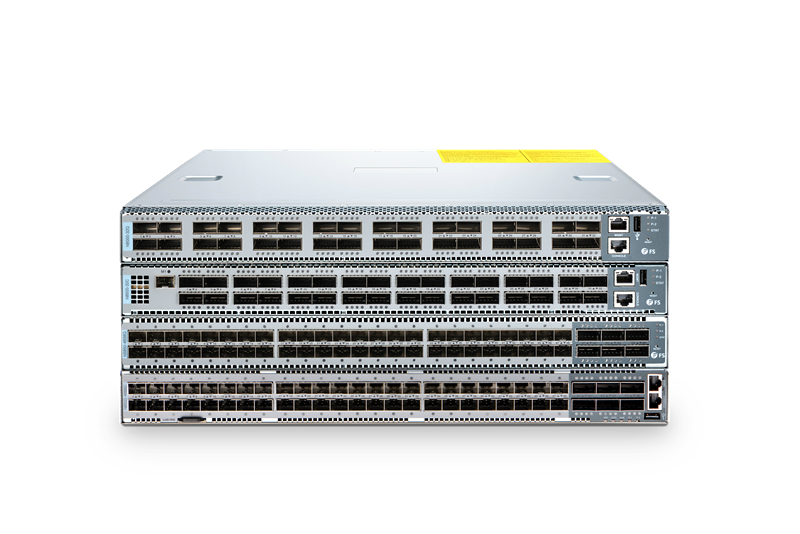
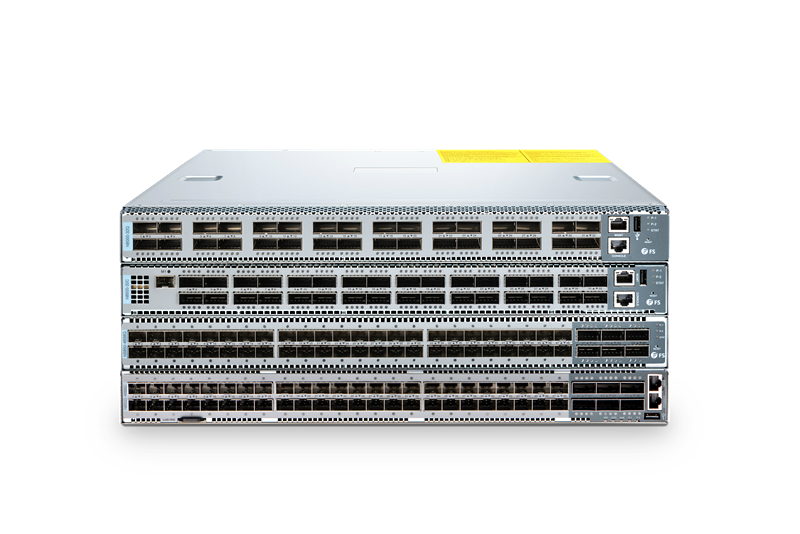
EVPN switch is a network switch with EVPN function. FS.COM has published N-series switch with Cumulus Linux OS which allows users to deploy EVPN. These switches are Top-of-Rack, Leaf switches or Spine switches in a compact 1U form factor. And this family provides multiple speed options, including 10Gb Ethernet switch, 25Gb Ethernet switch, 40Gb and 100Gb network switch. With low latency and power efficiency in a PHY-less design, N-series switches can provide stable, reliable and secure Layer 2/Layer 3 switching services. Besides, pre-loaded with Cumulus Linux OS, they support advanced features like MLAG, VXLAN, SFLOW, BGP, OSFP, EVPN etc. Thus, N-series switches are quite suitable for data centers and high-end industrial areas.
EVPN switch
Figure 2: FS.COM N-series switches.
And, more remarkable, N-series switches can deploy EVPN. Cumulus’s unique VXLAN EVPN solution provides unmatched interoperability and efficiency. Cumulus EVPN eliminates the complexity of layer 2 connectivity and frees customers from relying on proprietary controllers. With these FS EVPN switches, customers can quickly and easily support new applications, storage systems, multi-tenancy requirements and business growth using the same infrastructure. In addition, Cumulus EVPN can discover VXLAN tunnels automatically and exchange message among VXLAN nodes. Customers just need a few lines of code to create a single configuration which is available for all devices and routes. This can greatly reduce CapEx and OpEx.

Conclusion

From the above, I believe all of you have a good understanding of what is EVPN and what is EVPN benefit. FS.COM N-series EVPN switches are the best choices for data centers, since they can bring customers an open, high-performance and scalable solution for their networks and avoid vendor lock-in. If you’re interested in taking a more detailed look at the EVPN switch, please visit FS.COM, a reliable networking solution provider which also offers products like fiber transceivers, fiber cables, WDM & optical access solutions.

Understanding Fibre Patch Leads Types

Fibre patch leads offer a highly reliable way to transmit signals, which is widely used in telecom industry. When selecting the correct fibre patch lead for a data center or network, it may be a challenging task since there are various types on the market. Understanding fibre patch leads types would be greatly helpful.

What Is Fibre Patch Lead?

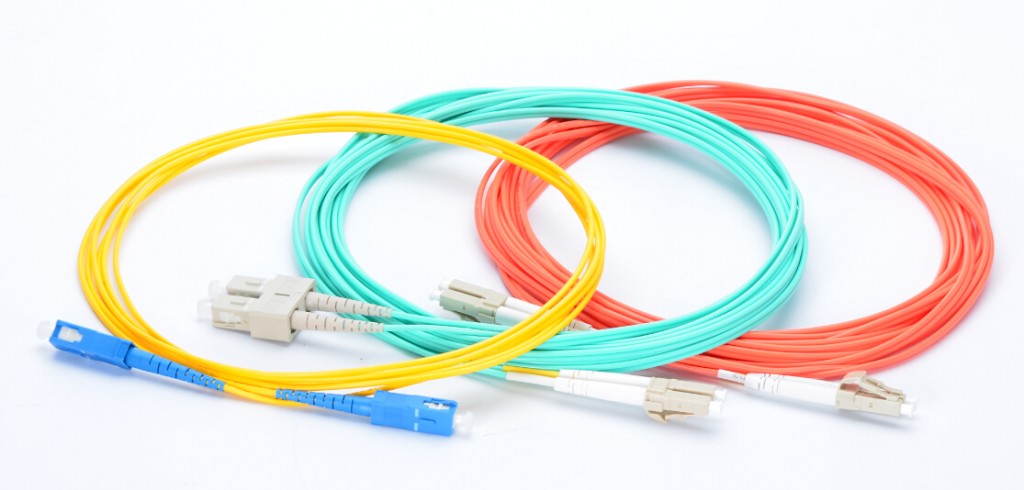
Fibre patch lead is a fibre optic cable with connectors like LC, SC on both ends. Sometimes it’s referred to as a fibre jumper. Fibre patch leads play important roles for indoor uses like server rooms. Usually, they are used to connect fibre optical transmitter, receiver such as fibre transceiver.
fibre patch leads types
Figure 1: Fibre patch leads.

Understanding Fibre Patch Leads Types

Fibre patch leads are divided into different types according to fibre cable modes, transmission modes and connector types.
Fibre Cable Modes: Single Mode vs Multimode
The mode of fibre cables indicates that how light beams travel within the fibre cables. Single mode fibre patch lead only allows one mode of light to pass along its length with a very thin diametre of 8-10 microns. Thus, it can carry signals at much higher speeds with lower attenuation, which is suitable for long distance transmission. Single mode fibre patch lead (OS1, OS2) is coloured yellow.
Multimode fibre patch lead is more complicated. It’s usually coloured orange (OM1, OM2), aqua (OM3, OM4) or green (OM5). Multimode fibre has a larger core, typically 50 or 62.5 microns, which enables multiple light modes to be transmitted. Multimode fibre patch lead is mostly used in short distance like the transmission within a building or campus. Note that, the two modes are not compatible with each other, that people can not substitute one for the other.
Transmission Modes: Simplex vs Duplex
Simplex fibre patch lead has one fibre and one connector on each end. It’s usually used when a data transmission needs to travel in only one direction. In contrast, duplex fibre patch lead has two fibres and two connectors on each end. The signal in duplex fibre needs to go both ways, which is also called bi-directional communication.
Connector Types: LC/SC/FC/ST/LSH/MU/MTRJ
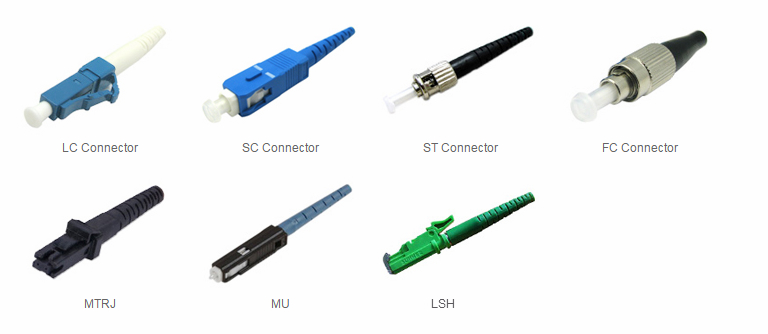
There are many connector types for fibre patch leads, like LC, SC, FC, ST, LSH, MU and MTRJ.
connector types
Figure 2: Different connectors types.
  • LC fibre patch lead. Its LC connector is a small, squarish one which is the most popular connector at present.
  • SC fibre patch lead. Connector of this fibre patch lead type is square, like an LC connector, but is about twice the size.
  • FC fibre patch lead. This patch lead connector uses round and threaded design.
  • ST fibre patch lead. Its connector is a round one that uses a bayonet mount design.
  • LSH fibre patch lead. This patch lead connector has a dust-proof cover, which can be automatically closed after the fibre is removed.
  • MU fibre patch lead. The MU connector looks like SC connector but with a ferrule about half the size.
  • MTRJ fibre patch lead. MTRJ stands for mechanical transfer registered. MTRJ utilizes two fibres and integrates them into a single design that looks similar to an RJ45 connector.
Note that, fibre patch leads can be terminated with the same connector type or hybrid connector types. The same connector type means that both ends of fibre patch leads must be one connector type. For the hybrid type, one end can be SC and the other end can be LC, FC, etc. And users also must pay attention to different polishing types. There are three types that can be applied to a fibre connector, PC, UPC and APC. Each polishing type represents a different level of back reflection. Users can choose one based on the actual demand.

Conclusion

These are the most common fibre patch leads types. If you know clearly different fibre patch leads types, you are able to determine which type characteristic you need, then you will make the right choice when selecting one. Here at FS.COM, we stock a full line of fibre patch leads, and we also offer the customised service. Welcome to pick and buy.

2018年12月14日星期五

Open Source Software: Cumulus Linux vs Big Switch vs Pica8

Open source software is the software that can be purchased separately for being installed on bare-metal devices. It is an essential part of today’s open networking. Combined with the bare metal switch, open source software create an open installation environment for IT staff to build a network with choices, better tools and cost improvements. Here, we’ll focus on open source software, and introduce several popular software on the market, including Cumulus Linux, Big Switch and Pica8.
cumulus linux network

What Is Open Source Software?

Open source software is also known as Network Operating System (NOS), which can be installed on a bare metal device such as a Gigabit Ethernet switch to make the devices “do things”, such as develop software, run applications and more.
In the past, a network switch is usually purchased as “black boxes” where the hardware and the software are tightly coupled together. In this way, customers can not get one without the other. For example, if one customer buys a Cisco Catalyst 4948 10Gb Ethernet switch, he will get the physical switch (hardware) and IOS (software) both.
In contrast, today, with the open networking develops, the hardware and software are decoupled. This means the same open source software can be run on multiple hardware configurations, or the same hardware can support different OSes. But notice that, choosing a NOS should depend on some factors such as hard compatibility (e.g. Cumulus have a partnership with Dell, HPE, etc.), supported features and level of support available.

What Are the Benefits of Open Source Software?

Open source software brings some benefits, including:
  • Power of choice. As mentioned above, IT staff can choose a NOS that suits their own hardware freely, avoiding vendor lock-in. Besides, selecting a NOS that they are familiar with, IT persons don’t need to spend extra time learning a new OS. So they can quickly control the software, and improve working efficiency.
  • Long term use. Since open source software is in the public domain, and OS suppliers such as Cumulus Network will constantly update their OS versions. So the suppliers will always keep checking the bugs and improving the performance of OSes, there is little chance that open source software may become unavailable or quickly outmoded. Thus, choosing open source software is an important plus for long term projects.
  • Cost saving. Generally, bare-metal switch are less expensive than the standard switches. For example, a 10Gb 48 port bare-metal switch from FS.COM costs 2999 dollars, while a standard 10Gb Ethernet switch with 48 ports needs 3599 dollars. Besides, the operating expenses are also less than from the proprietary vendors. Thus, the CapEX and OpEX can be reduced.

Software On the Market: Cumulus Linux vs Big Switch vs Pica8

According to the wide use of bare-metal switches, there is also a growing demand for open source operating systems. More and more companies start to develop OSes, such as Cumulus Networks, Big Switch Networks and Pica8. The following are the OSes produced by these suppliers.
Cumulus Linux
Cumulus Linux is a Debian based Linux distribution, which can be installed on a variety of commodity hardware such as Dell, Delta bare metal switch. Cumulus Linux allows users to take advantage of the existing automation tools for automatic configurations, which increases network stability and uptime. Besides, Cumulus Linux adopts web-scale methodology with network automation, helping customers to reduce costs by automating their networks.
Switch Light
Switch Light OS is a complete SDN operating system based on Open Network Linux (ONL), which is closely integrated with white box switches. This can ensure OpenFlow-like features to run on the current generation of switching chips for the data centers. Big Switch uses Big Cloud Fabric and Big Monitoring Fabric to address real business cases. Big Cloud Fabric enables virtual private cloud based logical networking, providing network automation and visibility for enterprise clouds and multiple public clouds, and Big Monitoring Fabric can offer end-to-end visibility and security for applications based on the network behavior.
PicOS
PicOS supports two versions, PicOS enterprise edition and PicOS SDN edition. Both the two versions contain the same Debian Linux distribution with the same unmodified kernels, which can achieve the maximum programmability of DevOps. Pica8 sells PicOS separately that can run on bare metal switches from some vendors like Inventec, Edgecore Networks, or its OS could be sold with their own white box switches. Note that the enterprise edition support CrossFlow, which is the ability to run both L2/3 and “classic” SDN OpenFlow control planes on every switch port in a network at the same time via CrossFlow. This is the biggest characteristic PicOS.
These OSes can be installed on the compatible bare-metal switches, customers can choose one according to the specific demands.

Conclusion

Open source software from Cumulus Linux, Pica8 and Big Switch Networks are attractive to customers. These OSes bring many benefits like cost saving, long term use and flexibility of hardware and software choices, avoiding vendor lock-in. But remember to check the compatible hardware lists before buying one.