2018年12月14日星期五

Will Different Ethernet Cable Speed Affect My Network?

Ethernet cables are the default physical connection for today’s home or business networks. People always want to buy a high speed Ethernet cable to enjoy a high speed network transmission. However, will different Ethernet cable speed actually affect your networks? Here, we’ll discuss the speeds of the most popular Ethernet cables categories (Cat5, Cat5e, Cat6, Cat6a, Cat7 and the newest Cat8), to help you make a wise choice.

Ethernet Cable Speed of Different Categories

The following is the overview of Ethernet cable speed of Cat5, Cat5e, Cat6, Cat6a, Cat7 and Cat8.
Cat5 Ethernet Cable Speed: 10/100Mbps for 100m
Cat5 Ethernet cable is the oldest type of these cables. It can support either 10Mbps or 100Mbps speed with a bandwidth of up to 100MHz, which was the first Fast Ethernet-capable to be introduced. However, with technology develops, this old-fashioned cable is no longer a recognized standard, that it’s hard to find it in today’s stores.
Cat5e Ethernet Cable Speed: 1000Mbps for 100m
Cat5e is an enhanced version of Cat5 cable. This Ethernet cable speed is up to 1000Mbps or “Gigabit” speed. In theory, it could be ten times faster than Cat5. Besides, it decreases crosstalk that happens between two wires inside a cable. Cat5e Ethernet cable is the most widely used category on the market.
Cat6 Ethernet Cable Speed: 1000Mbps for 100m and 10Gbps for 55m
Cat6 is certified to handle Gigabit speed with a bandwidth of up 250MHz. And it can be capable of 10Gbps speed under ideal circumstances. Cat6 Ethernet cable has some improvements like the better insulation and thinner wires, providing a higher signal-to-noise ratio. Thus, it’s quite suited for environments with higher electromagnetic interference. Note that, Cat6 Ethernet cable is provided with two forms, shielded twisted pair (STP) and unshielded twisted pair (UTP).
Cat6a Ethernet Cable Speed: 10Gbps for 100m
Cat6a Ethernet cable allows 10Gbps data transmission rate with the bandwidth of up to 500MHz. Its transmission can achieve to 100 metres, which is longer than the 37-55 metres of Cat6 cable. Cat6a is usually available in STP form. This cable is ideal for industrial situation, but lack flexibility that is often needed for a residential deployment.
Cat7 Ethernet Cable Speed: 10Gbps for 100m
Ethernet cable speed of Cat7 can reach to 10Gbps with a bandwidth of up to 600MHz. It consists of a screened, shield twisted pair of wires, which completely eliminates alien crosstalk. It’s more suited to data centres than home use.
Cat8 Ethernet Cable Speed: 40Gbps for 20m
Cat8 is capable of supporting bandwidth of up to 2000MHz. This Ethernet cable speed can be up to 25/40Gbps. It’s the fastest Ethernet cable, which is not intended for office environments, but suitable for connecting equipment in data centres such as connecting server to switch.
For better reference, the following table lists the Ethernet cable speed and bandwidth of these cables.
Category
Speed
Bandwidth
Cat5
10/100Mbps
100MHz
Cat5e
1000Mbps
100MHz
Cat6
1000Mbps
250MHz
Cat6a
10Gbps
500MHz
Cat7
10Gbps
600MHz
Cat8
25/40Gbps
2000MHz

Technical and Physical Differences

The typical technical differences are clear to see. As the category number increases, so does the Ethernet cable speed and bandwidth. This is not a coincidence, because each category brings more rigorous testing to eliminate crosstalk and add isolation between the wires. Thus, Cat8 supports the highest transmission speed.
As for the physical differences, Ethernet cables use different construction and isolation to eliminate interference and allow for faster speeds. Take the cables from FS.COM as an example. Its Cat6a, Cat7 and Cat8 use screen shield and aluminum foil shielding for reducing crosstalk, while Cat5e and Cat6 don’t. So Cat6a, Cat7 and Cat8 have better performance.
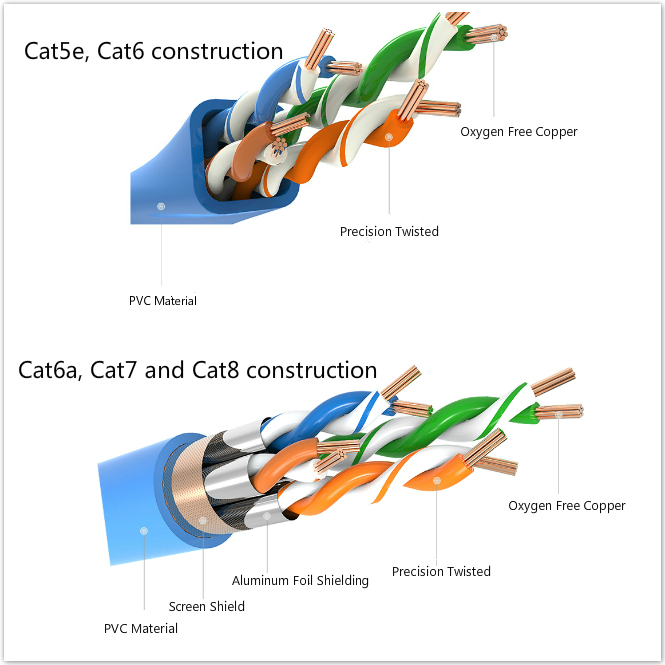
Ethernet cable speed factor

Is It Worth to Upgrade?

Actually, for home connections, a Cat5e or Cat6 cable with 1Gbps Ethernet cable speed is fast enough. People should note that upgrade cables will not make a difference in how fast you load websites, because the Internet speed depends on many factors but not just the Ethernet cable speed. But for places like data centres, of course, the faster the better. Because these places have high requirements for transmission speed. If you decide to buy Ethernet cables, welcome to order at FS.COM that provides comprehensive products of Ethernet cables.

2018年12月7日星期五

Is Cumulus Linux and White Box Switch Combination A Good Idea?

Today, enterprise organizations are facing the challenges of highly dynamic computing, storage and networking needs than ever before. They want to build data centers with efficiency, scalability and flexibility for these increasing demands. In this quest for the perfect solution, an approach has been proposed, that is to deploy white box switch with Cumulus Linux operating system (OS). Is it a good idea? Here we will discuss it.

What Is White Box Switch?

White box switch is a data switch that is pre-loaded with minimal software or simply sold as a bare device. By using white box switches, IT staff can separate hardware-purchase decisions from software decisions. They can choose Linux or other OSes to manage the switch and network applications based on their own network demands and scales. This freedom of choice brings an open network installation environment and dramatically drives costs down.

Why Use White Box Switch with Cumulus Linux?

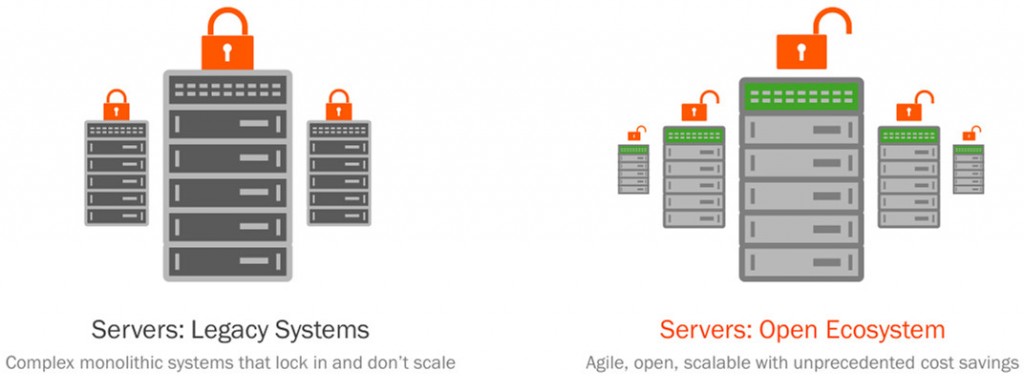
Most traditional switches’ OSes are highly locked and limited by traditional switch vendors like Cisco. Data centers have to pay a lot for new proprietary hardware or software. Besides, it takes a long time for vendors to develop new hardware which can satisfy the increasing network demands. Plus, with the development of white box switch, IT staffs hope to use an open network OS that can run on the white box switches. Under these reasons, Cumulus Linux is developed, which could be applied in white box switches and a variety of commodity hardware like Dell, Delta, HPE and so on. It helps users to unlock the network stack that they can choose the best hardware, applications, instead of using the expensive proprietary hardware. There is no vendor lock-in anymore, so the users can set up network architectures according to their specific requirements or scales. This helps to reduce CapEx and OpEX. Besides, Cumulus Linux provides standardized toolsets that are compatible with their hardware, so customers can use the tools such as automation and others to improve efficiency.
Cumulus Linux vs traditional

Is Cumulus Linux and White Box Switch Combination A Good Idea?

Both Cumulus Linux and white box switch promises flexibility and lower costs, so should we all need to make the leap? It depends. For those small or medium size networks, they already have a comprehensive support from the traditional vendors, and they don’t need to change or upgrade their networks frequently. Therefore, these enterprises don’t need to change the existing network devices for staying up-to-date with the trend. However, for those big data centers, they will quickly find the flexibility and cost saving of Cumulus switches. In these places, Cumulus switches provide customers with affordable and flexible networking options.
  • Cost Saving
Compared with the traditional network operating system (NOS) which is closed to users, Cumulus Linux provides an open network installation environment. Thus, users are no longer limited to one vendor’s hardware. Today, many network manufacturers like Delta, Accton are producing hardware like bare-metal hardware or white box switch. And the hardware can be built in all types, ranging from a Gigabit Ethernet switch or 10Gb Ethernet switch to 40G/100G switch. The switches that support Cumulus Linux allow users to choose the optical and electrical pluggable device they want to use, without using the software supported by the brand switch vendors. This conserves the precious budgets.
  • More Flexible Automation
Plus, Cumulus Linux helps users manage the switch with automation. Thus, all the configurations are stored in one place. Users don’t need to log into the switches when they need to make a change to different switches. They just make changes in one centralized repository, which makes upgrades much easier. Of course, network automation isn’t new. Big switch producers have their own automation tools. If users use their network OSes, they have to use the producers’ networking devices, too. This makes network operation fragile, complicated and expensive. However, white box switches with Cumulus Linux change it. Ansible, Chef and Puppet are popular automation tools that run on Linux. This provides users the flexibility to choose the applicable tool that works for their networks. Once you get Cumulus switches, you are free to choose your software and tools, instead of using expensive proprietary products. This will greatly reduce one’s network budget.

Conclusion

The combination of Cumulus Linux and white box switches helps users to set up networks with efficiency, scalability and flexibility at a low cost. For big data centers, it’s an economical solution for reducing the cost and eliminating vendor lock-in. But for small or medium size networks without frequent upgrade demands, it’s not the best one. Therefore, customers should decide whether to use Cumulus switch or not according to their actual situations.

2018年11月30日星期五

Fiber SFP Module Compatibility with APC, UPC, PC

APC, UPC, PC are different polishing types of fiber patch cable connectors. And we always hear the description like LC UPC/APC duplex single mode patch cables. What exactly are they, and which fiber connector can work with your fiber SFP module? Here introduces the definitions of the connectors, and explains the SFP module compatibility with APC, UPC, PC connectors.

What Does APC, UPC, PC Mean?

APC, UPC and PC connectors are different polish styles of fiber optic ferrules, which determine the quality of the fiber optic lightwave transmission, mostly performed in optical return loss and insertion loss.
Fiber SFP module compatibility with APC, UPC, PC
Figure 1: Picture of APC, UPC, PC connectors.
PC
PC stands for physical contact, which is the most common connector used in fiber connection. The end faces of this design are polished with a slight curvature. And the raised shape places the fibers at the highest point of the surface, which reduces air gap between them and forces the fibers into contact. Its typical return loss is about -40 dB, which means 0.01% of the light is reflected back. PC connector is used in most applications.
UPC
UPC, or ultra physical contact, is an improvement to the PC connector. UPC connector uses an extended polishing method to achieve a better surface finish. And the curvature makes it look dome-shaped. Its return loss is about -55 dB or higher. UPC connectors are often used in Ethernet network equipment like serial devices or network switches. Also, they are applied in digital and telephony systems.
APC
APC is short for angled physical contact, which is the latest technology in fiber connectors. Its ferrule is polished with an 8-degree angle, which can reduce the light reflected between the cables. The return loss is about -60 dB, providing a better performance connector. Thus, APC connectors are used in radio frequency applications that require higher optical wavelength ranges. In addition, since GPON and passive optical LAN also use radio frequency to deliver video, APC connectors are employed in these applications.

Fiber SFP Module Compatibility Is Important

Most optical transceiver modules have two ports for bidirectional communication. One port is used for sending signals and the other one is for receiving signals. Normally, this transmission process is achieved through a fiber patch cable. And note that the fiber patch cables are designed with different connectors, like SC APC, LC UPC and so on. So it’s important to check whether the fiber connectors are compatible with the SFP optical transceivers before making the connection. Otherwise, it will cause serious consequences such as invalid connection or network failure. For example, we can not use APC connector in SFP modules. Because APC connector has an angle, but the connector of the SFP module is flat. Therefore, misalignment will be created when mating APC and SFP module, which will result in more loss and even the interface within the transceiver may be damaged.

APC vs UPC vs PC, Choose the Correct One For Fiber SFP Module

In principle, different connectors can not be mated. However, the fiber ends of PC and UPC are flat, and the difference between them is the quality of polishing. Therefore, UPC and PC are compatible and interchangeable without causing any damages to the connectors. This means UPC or PC fiber can be equally used with fiber SFP module.
However, the physical and mechanical properties of APC connector are quite different. This means APC should not be mated with UPC or PC. If someone does that, it will destroy the connectors. Plus, it’s not recommended to use APC connectors in fiber SFP modules. Unless the transceiver module has stated clearly that the APC connectors are allowed, users may use UPC connectors. If the network requires a connection between a fiber SFP module and an APC connector, users must use a conversion patch cable (UPC to APC) to connect from a transceiver with flat UPC/PC interface to an angled APC interface.
SC UPC vs SC APC
Figure 2: Example of SC UPC vs SC APC.

Conclusion

Now, it’s clear that UPC and PC connectors are generally used in Ethernet network equipment like fiber switch, and are compatible with most standard fiber SFP modules. Instead, APC connectors are mostly employed in PON network architecture or passive optical LANs, and they are not recommended to be used with fiber SFP modules. Therefore, choose the right connector depends on your particular networking needs. FS.COM provides a full line of fiber connectors with APC/UPC/PC polishing types and fiber SFP module. For more details, please feel free to contact us via sales@fs.com.

2018年10月24日星期三

FS Fiber Optic Cable Types

To date, fiber optic cables have brought high speed network services to companies, campuses and homes. And we have discussed fiber optic cables a lot in the past, such as Introduction of Fiber Optic Cable. However, the truth is we have just scratched the surface of this complicated system. Different fiber optic cable types are versatile in the function and installation. Today, we’ll introduce FS fiber optic cable types in order to further understand the optic cables.

Why Fibers?

Fibers are truly one of the greatest inventions of our world. They are slim cables that have thousands of optic fibers within the plastic, outer jacket. The optic fibers are incredibly hair-thin strands of glass that transmit data by light, which is quite different from the copper cables or RJ45 cables. Basically, compared with the copper cables, fiber cables are much more efficient and secure for network applications. They can deliver more data with a greater degree of fidelity over greater distances. In addition, because fiber cables are made of glasses, they are immune to any type of electrical interference. Therefore, these cables could be put in direct contact with soil or in close proximity to chemicals without concern.

FS Fiber Optic Cable Types

To make a clear product catalog, FS has classified the fiber cables by different applications. Therefore, people can select the cables more easily according to their various needs.
MTP/MPO Fiber Cable
MTP/MPO fiber cables consist of MTP/MPO connectors and fiber cables. Each cable can bring 8, 12 or 24 fibers together in a single MTP/MPO interface. And other connectors like SC or LC are also could be found in some MTP/MPO cables. MTP/MPO cables are designed for 40 or 100G applications in data centers for ultra-high density cabling. FS MTP/MPO cables have low insertion loss, and help you reach direct connection for 40G connectivity. As the figure shows, MTP/MPO cable is usually used for connecting optic transceivers, MTP cassettes and fiber adapter panels and so on.
mtp cables
Figure 1: MTP/MPO cable is widely used.
Fiber Patch Cables
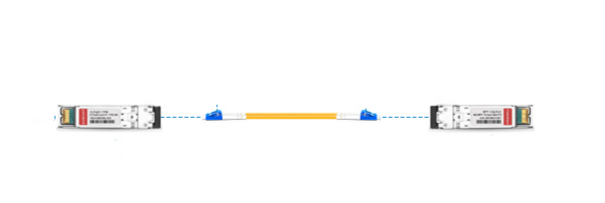
Usually, fiber patch cables are terminated with fiber optic connectors such as LC, SC, ST and so on at each end of the cables. Through these connectors, optical cables can be connected to network switches, patch panels or other networking devices. Based on fiber cable mode, fiber patch cables are divided into single mode fiber like OS2, and multimode fiber such as OM3 and OM4. All FS fiber patch cables are made of PVC jacket material with low insertion loss and attenuation at different distances. They play important roles for indoor uses like server rooms. Commonly, fiber patch cables are used to connect transceiver modules. Note that, fiber cables with different connectors must be connected with the transceivers that have the corresponding interfaces. For example, the following cable is a LC to LC single mode cable. Therefore, the transceivers here must have LC interfaces.
fiber optic cable types- fiber cable
Figure 2: A fiber patch cable connects two transceivers.
Ultra HD Fiber Cables
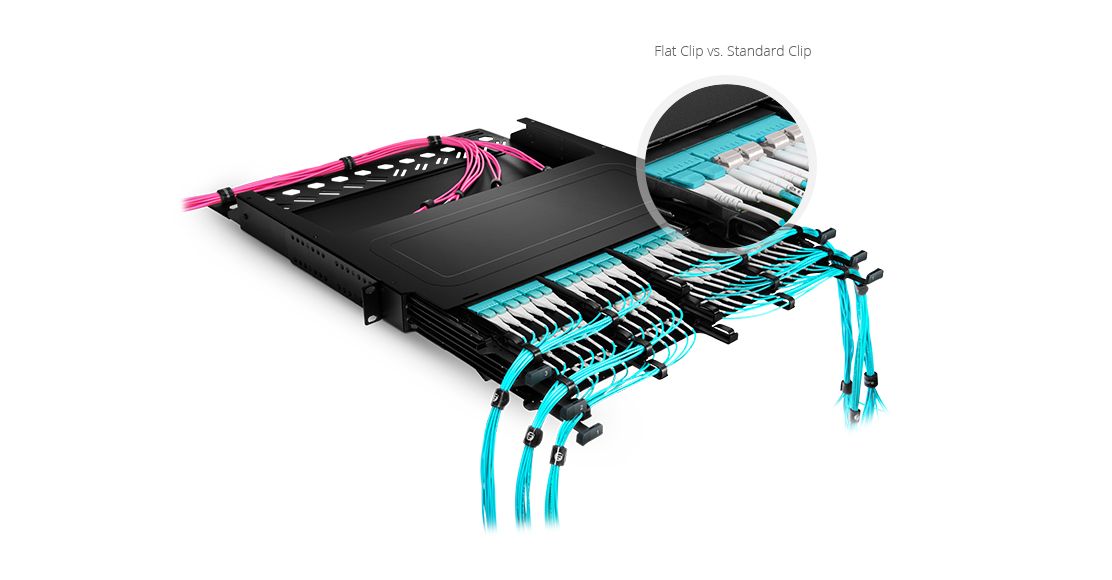
In FS ultra HD fiber cables catalog, there are ultra low loss LC SMF/MMF, uniboot LC cables, BIF fiber cables and customized LC+ cables. Compared with traditional fiber cables, ultra HD fiber cables use a compact design with a flat clip model and a slimmer wire body, which saves about 50% of cabling space. This is extremely suitable for high density data centers.
ultra HD fiber cables
Figure 3: Ultra HD fiber cables save lots of space.

Conclusion

Where to buy fiber optic cables? FS is absolutely your preferred choice. Here we offer different fiber optic cable types, MTP/MPO cables, patch cables and ultra fiber cables for all your voice, video and data communication needs. In addition, FS provides customized services for fiber cables with a favorable fiber optic cable price. Any questions about fiber cabling, please contact us via sales@fs.com.

2018年10月16日星期二

Cisco Transceiver Module: GLC-T vs GLC-TE

Cisco SFP transceiver modules have become exceedingly popular with the widespread of Cisco routers and switches. GLC-T and GLC-TE are the two types of Cisco SFP transceiver module. Since the name GLC-T and GLC-TE are quite similar, many end users may be confused. So are they the same one? Here we’ll focus on GLC-T vs GLC-TE to help find the answer.
<p style="text-align: justify;">

GLC-T Datasheet

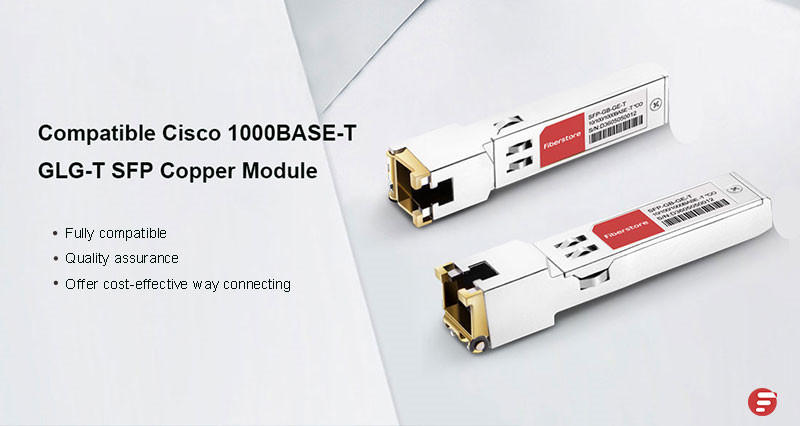
Cisco GLC-T SFP is a 1000BASE-T Small Form-Factor Pluggable RJ45 interface converter. It can be inserted into Gigabit Ethernet ports to connect ports to the network. GLC-T SFP transceiver provides 1Gbps data transmission. Besides, it supports the full-duplex Gigabit Ethernet connection for the high-end workstation. Operating on CAT5 cables, this SFP transceiver is designed with the max cable distance up to 100 meters. However, GLC-T has not been on sale since June 1, 2017. The following is the GLC-T datasheet.
Description
1000BASE-T SFP transceiver for CAT5 wire, RJ 45 connector
Max Data Rate
1000Mbps
Max Distance
100m
Operating Temperature
0 to 70°C (32 to 158°F)
Commercial Availability
Announced EOS by Cisco and has not been available for sale since June 1, 2011

GLC-TE Datasheet

GLC-TE transceiver is also a Cisco SFP module that designed for Gigabit Ethernet applications. It’s compatible with the IEEE802.3 1000BASE-T standard. It’s the replacement model of GLC-T, which means GLC-TE is an improved technology product. Therefore, this transceiver is designed with the same features of GLC-T type, but has an extended temperature range from -5 to 85°. GLC-TE is the latest in technology and definitely will continue to be sold for years. The table below shows GLC-TE datasheet.GLC-TE Datasheet
Description
1000BASE-T SFP transceiver for CAT5 wire, RJ 45 connector, extended temperature
Max Data Rate
1000Mbps
Max Distance
100m
Operating Temperature
-5 to 85° (23 to 185°F)
Commercial Availability
New product and will continue to be sold for years.

GLC-T vs GLC-TE: Difference and Similarity

  • Difference. From the above, we can clearly know that the main difference between GLC-T vs GLC-TE is the operating temperature. This means GLC-TE can work in a lower or higher temperature environment without any damage.
  • Similarity. Both GLC-T and GLC-TE are 1000BASE-T copper transceivers that comply with IEEE 802.3 standard. They support the same data transmission speed and cable distance via CAT5 copper cables. However, considering that GLC-T SFP transceiver has stopped production, GLC-TE is the best choice.
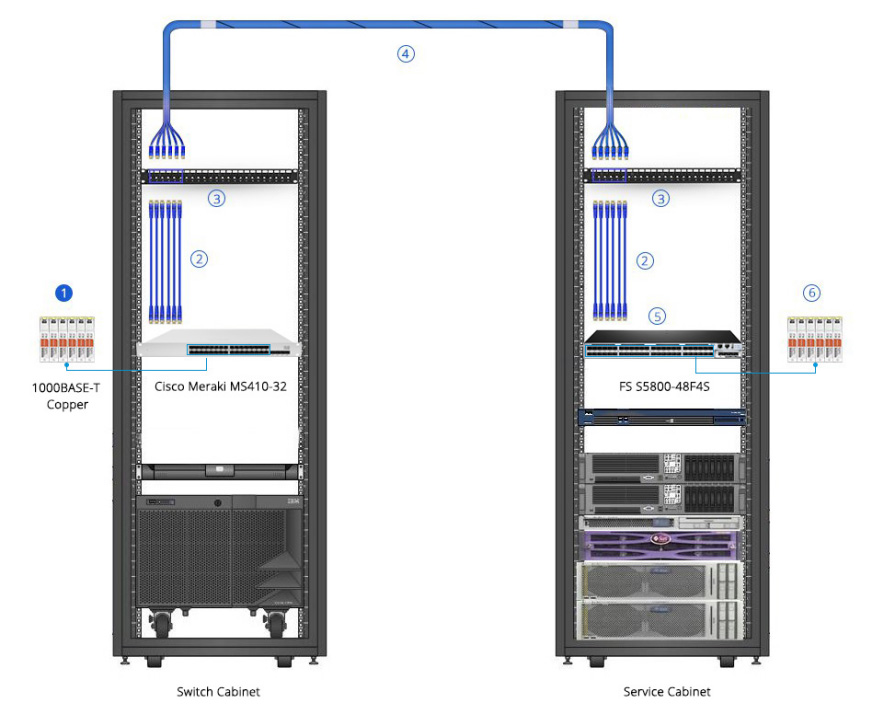
In addition, as for GLC-T vs GLC-TE, there are many similarities except for operating temperature. The two SFP transceivers can be used in the following cabling system.
glc-t vs glc-te cabling
All the networking equipment is produced by FS.COM. They are:
Item NO.
ID
Description
11773
Cisco GLC-T Compatible 1000BASE-T SFP Copper RJ-45 100m
35544
3.3ft (1m) Cat6 Snagless Unshielded (UTP) PVC Ethernet Network Patch Cable, Gray
69180
24 Ports Cat6 Feed-Through Patch Panel, UTP Unshielded, 1U Rack Mount
69066
3m (10ft) 6 Plug to 6 Plug Cat6 Unshielded PVC CMR (Blue) Pre-Terminated Copper Trunk
29127
S5800-48F4S (48*1GE+4*10GE) High Performance Data Center Switch
20057
Generic Compatible 1000BASE-T SFP Copper RJ-45 100m

Conclusion

As for GLC-T vs GLC-TE, we have found the difference and similarity. Both GLC-T and GLC-TE SFP transceivers are widely used because they are convenient and cost effective means for adopting Gigabit Ethernet in a myriad of industries and sectors. As a reliable and qualified networking solution supplier, FS.COM provides a full line of networking equipment like transceivers, switches etc. For further information, please visit FS.COM.

2018年10月9日星期二

What Is PoE and Power Over Ethernet Switch?

Network switches with PoE technology are widely used in business, school districts and healthcare facilities for the big benefits of their IP surveillance networks. So what is PoE, what is power over Ethernet switch, could you explain?

What is PoE?

PoE is short for power over Ethernet, which is a technology that can pass electrical power through an Ethernet cable alongside data. For example, if a digital camera is PoE-enabled, it only requires a network connection since it would receive the electrical power from the power over Ethernet cable. PoE technology actually makes hooking up network devices more convenient in any context. By doing so, the number of cables that must be configured for network installation will be greatly minimized. Therefore, PoE technology makes networking setup much simpler and less expensive.
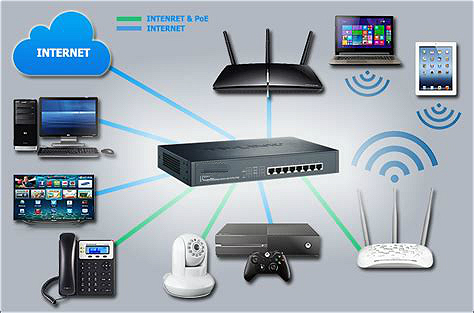
Power over Ethernet usually starts with a Gigabit PoE switch or power over Ethernet injector, which pumps out the electrical power over the Ethernet ports and passes it to the device end via Ethernet cables. So what is power over Ethernet switch?

What Is PoE Switch?

A power over Ethernet switch is a normal rack-mounted network switch with integrated power over Ethernet functionality. It can automatically recognize the PoE devices like IP surveillance camera or wireless access point that connected to the switch, and pass power to the device accordingly. Network switches deliver power based on some standards. According to IEEE 802.3af, the delivering power can be up to 15.4 Watts on a switch port, while IEEE 802.3at rules that the one port can deliver power up to 30 Watts. To find the switch that is right for you, all you need to do is choose a switch according to your power needs.
In addition, there are managed and unmanaged options of PoE switches on the market. Unmanaged PoE switch is a plug-and-play device, which only provides power and signaling to Ethernet endpoints. On the other hand, managed PoE switch supports many advanced features, including VLANs, SNMP so as to manage and monitor the network. Considering the rapid growth of today’s technology and the future’s upgrade, I think it’s wise to choose a managed PoE switch.

Using Power Over Ethernet Switch to Upgrade Your Network

When connecting to the networking devices, PoE switches are a more cost-effective choice. As the figure below shows, users are able to connect the IP phones, wireless access points and IP cameras directly to the PoE switch. There is no need for additional wiring, power sources. Thus, in this case, it can save time and money for additional wiring, which will result in a relatively lower cost.
what is Poe and power over Ethernet switch
The following table lists some switches produced by FS.COM that I want to recommend to you. They are available in 8, 24 and 48 ports. Look at the product detail, and select one for your need.
FS P/N
S1250-8T2F
S1600-24T4F
S1600-48T4S
Description
8 10/100/1000Base-T RJ45 Ethernet ports, 1 console port, and 2 Gigabit SFP slots
24 10/100/1000Base-T RJ45 Ethernet ports, 1 console port, 2 combo port, and 2 Gigabit SFP slots
48 10/100/1000Base-T RJ45 Ethernet ports, 1 console port, 4 10G SFP+ slots
Power Consumption Per PoE Port
Max.30W
Max.30W
Max.30W
Switching Capacity
20Gbps
52Gbps
180 Gbps
Forwarding Rate
14.88Mpps
38.69Mpps
130.94 Mpps
S1250-8T2F and S1600-24T4F are 1G switches, which are suitable for home and small business application. S1600-48T4S is a 10Gb switch, which is designed for medium business networks.

Conclusion

Power over Ethernet switch is a great choice when you want to set up a cloud phone system or wire a security camera cluster since it can save your time and money and adds flexibility to your IP network. Want to find a good network switch, please visit FS.COM, both copper switch and fiber optic switch could be found here.

2018年10月5日星期五

Selecting the Best Gigabit Switch for Home Network

As the Internet has become more and more prevalent, today almost all homes have built a home network via a network switch. Network switches keep multiple devices like computers, tablets connected, enabling the networked devices to talk to each other and share files like the family photo album, or back up files to a number of devices at once. But do you know how to select the best Gigabit switch for home network since there are so many types of Gigabit switches on the market?
network switch for home use
Figure 1: A network switch is used for home applications.

Why Do You Need a Gigabit Switch for Home Network?

Implementing a Gigabit switch for home network would ensure your network security. Since a Gigabit Ethernet switch can work at the Data Link Layer of the OSI model, it will recognize what devices are connected to it by learning the device’s MAC address, which aids in keeping data secured by preventing unwanted access. Besides, most network switches support VLAN, so users can set up one VLAN for their houses and one VLAN for the wireless. And users can allow both VLANs to talk to the router but deny the ability to talk to each other. Users could even lock down the wireless VLAN and only allow it to browse the web but nothing else. Thus in these cases, you can use the network switch to manage your network and ensure its safety.
In addition, if you are a professional gamer or videographer, then you must have lots of computers and network devices to run. Therefore, you need a Gigabit switch to manage and connect your equipment.

How to Select the Best Gigabit Switch for Home Network?

Here are some considerations to help you to choose the best Gigabit switch for home network.
How Many Ports Do I Need?
Network switches come with varying numbers of ports. The more ports the Gigabit switch has, the more devices you can connect to the network. When choosing a switch, you need to consider that whether the interfaces are enough to support the future upgrade. It’s better to have a switch that has more interfaces than the actual need. For home use, a 16 port Gigabit switch or 24 port Gigabit switch is a wise choice.
How Much Speed Will the Switch Provide?
To satisfy different demands, the Gigabit switches support up to 15Mpps, 95Mpps, and 130Mpps forwarding rate. So users can choose one based on the required forwarding speed.
What Level of Technical Support Do I Need?
How easy is it to configure the switch and is there a local support team if I run into any problems? If the switch breaks down, you can contact the local technical support immediately. Thus, have a good understanding of the level of support, you can save hassle and improve uptime.

Best Gigabit Switch for Home Network Recommendation

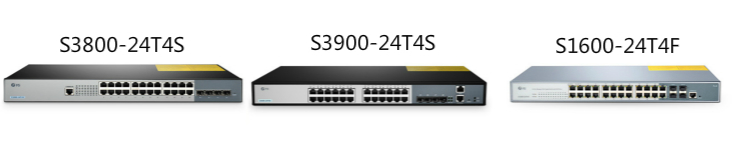
Considering all the factors, I recommend some 24 port Gigabit switches as follows that are made by FS.COM. FS can provide local support in the USA, UK, Germany, Australia and Singapore.
Type
S3800-24T4S
S3900-24T4S
S1600-24T4F
Description
24-Port 10/100/1000BASE-T Gigabit Stackable Managed Switch with 4 10GE SFP+
Fanless 24-Port 10/100/1000BASE-T Gigabit Stackable Managed Switch with 4 10GE SFP+
PoE+ Managed Switch with 4 SFP
Switching Capacity
128Gbps
128Gbps
52Gbps
Forwarding Rate
95Mpps
95Mpps
38.69Mpps
Price (US Dollars)
$349.00
$279.00
$419.00
If you want a PoE switch, S1600-24T4F is a good choice. If you want a stackable switch, S3800-24T4S and S3900-24T4S both are the ideal products. Note that S3900-24T4F uses the fanless design, which can provide a quiet environment for you. Therefore, with the same switching capacity and forwarding rate, S3900-24T4S is the highly cost-effective choice.
best Gigabit switch for home networkFigure 2: Recommendations for best 24 port Gigabit switch for home use.

Conclusion

Choosing the best Gigabit switch for home network allows users to enjoy the smooth gaming and streaming. If you are looking for a home network switch, FS is ready to offer you a wide range of network switches including 10GbE switch, 40G switch and even 100G switch.